Start with sources
Identify authoritative attributes, account schemas and matching rules. Decide how ambiguous or unmatched accounts will be resolved.
 Limosaidentity
SOLUTION ARCHITECTURE
See how AI assistants and the web workspace use the same governed operations to connect inventory, decisions and durable execution.
A compatible AI assistant discovers available operations and acts on your instructions.
Your tenant and current permissions determine what the assistant can do.
Connections, mappings, roles and workflows
Requests, reviews, tasks and fulfillment
Inventory, reports and operation history
Conceptual architecture. Bulk work runs through background jobs; approvals, execution results and observed access remain separate.
Logical architecture. Connections and execution capabilities depend on configuration; this is not a deployment topology.
A MODEL THAT PRESERVES CONTEXT
Identity governance spans several systems and several kinds of truth. Limosa Identity keeps those records connected while preserving what each one establishes.
Role assignments and configured policies define the desired state.
Requests and review decisions capture the human or policy decision.
Provisioning operations and manual tasks record progress and outcomes.
Aggregation and read-back provide evidence of the target state.
A recorded approval does not establish that provisioning succeeded. Compare the execution result with observed access.
BUILT FOR OPERATIONAL WORK
Aggregation imports accounts and entitlements. Identity refresh evaluates identity data and configured policy effects. Provisioning attempts changes in target systems. Each has its own trigger, progress and history.
Background processing keeps bulk operations outside page requests. Operators can monitor work in Tasks and investigate individual execution outcomes when an application is unavailable or a change needs manual completion.
Custom JavaScript runs in the separate transform runtime with execution limits. Connector access uses configured credentials and approved secret references.
Explore security boundaries →People and authorized AI clients search, configure, approve and review through authenticated interfaces.
Validate requests, enforce permissions and persist tenant-scoped decisions.
Process aggregation, refresh and provisioning outside the interactive request.
Call configured target operations and evaluate customer JavaScript within its separate execution boundary.
Conceptual processing path. Worker progress and operation histories remain separate from the original user decision.
FROM THE MODEL TO THE WORKSPACE
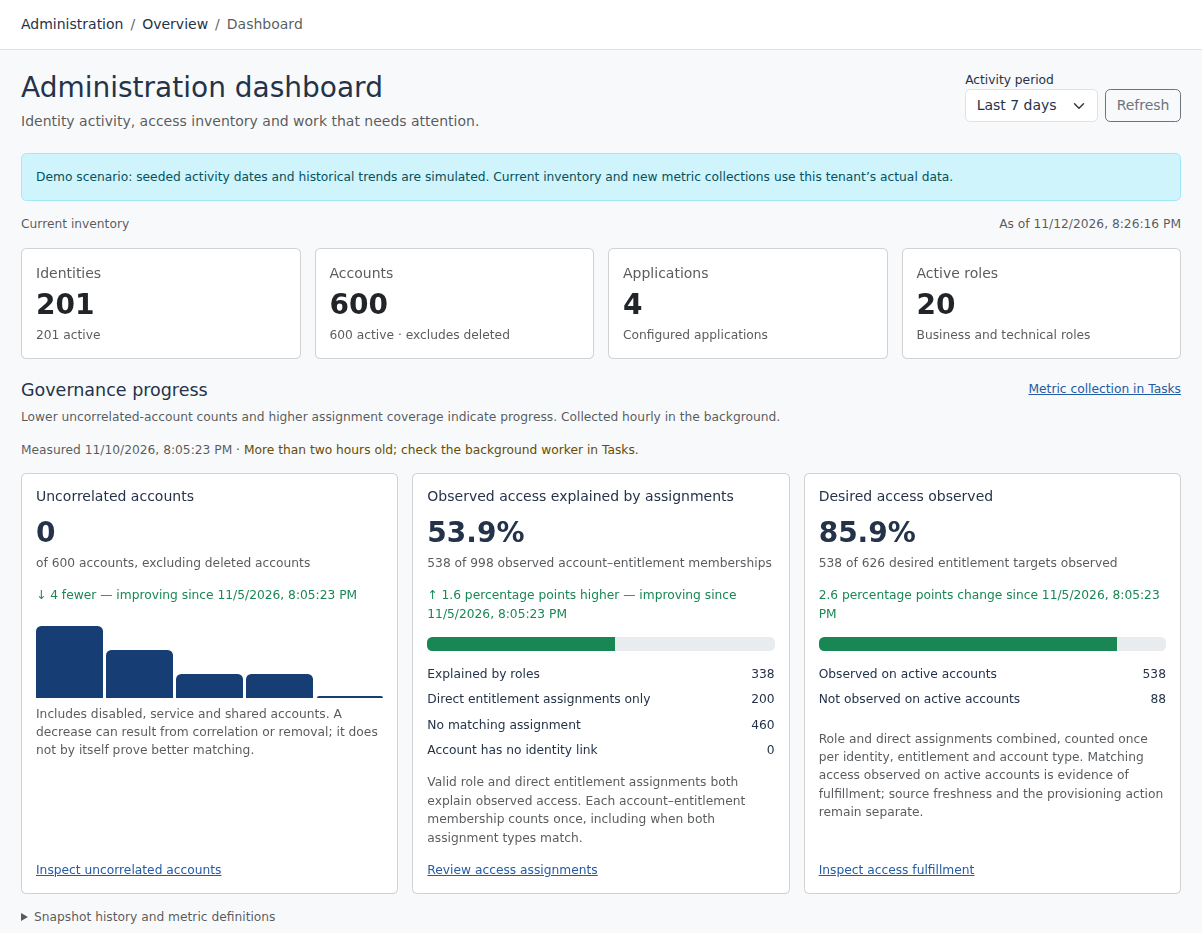
The administration dashboard brings together current inventory and governance activity. It gives administrators a starting point for investigation, while task and object histories retain the underlying detail.
Example dashboards contain seeded activity. Your own deployment’s records and metric collection determine the values you see.
Identify authoritative attributes, account schemas and matching rules. Decide how ambiguous or unmatched accounts will be resolved.
Establish role ownership, requester eligibility, approval paths and review responsibility before enabling governance workflows.
Test supported connector operations, credential access, transforms and manual fulfillment. Confirm the target result before expanding scope.
FULL AI SUPPORT
Operate and configure Limosa through an MCP-compatible AI assistant. The full management interface is available to AI, with the same permissions, validation and audit trail as the web workspace.
Start with https://identity.limosa.io/mcp. No existing Limosa account needed: sign in and create your workspace when prompted.
YOUR NEXT STEP
Explore the public demo or bring your applications and governance questions to a guided conversation.