Limosaidentity

ENTERPRISE APPLICATION INTEGRATIONS

Your enterprise.
Connected by identity.

Bring workforce data, directories and business applications into one access picture. Start with the systems your organization already runs.

FROM PEOPLE TO APPLICATION ACCESS
Workday® Workforce data
SAP SuccessFactors HR records
Import & correlate
Limosa Identity Inventory · Policy · Decisions · Evidence
Govern & provision supported access
Microsoft Entra ID Salesforce ServiceNow Snowflake

Illustrative architecture · configure each connection and policy.

START WITH YOUR CORE SYSTEMS

Workforce context.
Directory reach.

Connect HR records to governed identities, then manage supported account and access changes in your directory.

DIRECTORY & ACCESS

Microsoft Entra ID ↗

Bring directory accounts and entitlements into governance through Microsoft Graph. Configure supported account lifecycle and membership operations.

  • Import accounts and access inventory
  • Create, update and manage account status
  • Assign and remove supported memberships
Connection requirements

Configure directory trust and Graph admin consent. Built-in workload identity federation is available alongside client-secret authentication.

Inventory + provisioning

WORKFORCE SOURCE

Workday® ↗

Use a web-service-enabled custom report to bring worker records into your identity governance process.

  • Read a complete worker report
  • Map a stable worker identifier
  • Include inactive workers in the source
Connection requirements

An integration user and a complete report with the fields you need. Configure identity mappings and correlation in Limosa.

Read-only HR import

WORKFORCE SOURCE

SAP SuccessFactors ↗

Import user records through the OData v2 User entity, including inactive users, to inform your identity inventory.

  • Read active and inactive users
  • Use OAuth or API-user credentials
  • Map source fields to your identity model
Connection requirements

An API user with complete roster permissions. This connector covers SuccessFactors user import, not the wider SAP application portfolio.

Read-only HR import

EXPLORE ALL 32 CONNECTION OPTIONS

Find your next connection.

Browse enterprise products, workforce sources and flexible connection methods. Open a connector to explore its features, architecture and setup.

32 connectors and connection methods

Collaboration & engineering

Asana

Enterprise domain users and teams. Asana does not support reactivating deprovisioned users through SCIM.

Inventory + supported writesExplore →
Collaboration & engineering

Atlassian Cloud

Manage users and groups in an Atlassian provisioning directory. Requires Atlassian Guard and directory provisioning credentials.

Inventory + supported writesExplore →
Directories & identity

AWS IAM Identity Center

Manage Identity Center users and groups through SCIM. Does not manage IAM users, policies or permission sets.

Inventory + supported writesExplore →
Collaboration & engineering

Azure DevOps

Import organization users, groups and direct memberships using a PAT with Graph read permissions.

Read-only importExplore →
Workforce sources

BambooHR

Import the employee roster with cursor pagination. API key permissions must include all governed employees and their status.

Read-only importExplore →
Business applications

Box

Managed enterprise users, groups and direct memberships. User deletion and content transfer require separate administration.

Inventory + supported writesExplore →
Business applications

Cisco Webex

Organization people and directly assigned licenses. Licenses are read-only entitlements; messaging teams and groups are outside this connector.

Inventory + supported writesExplore →
Data & observability

Datadog

SCIM organization users and managed teams. Requires an eligible plan and SCIM key permissions.

Inventory + supported writesExplore →
Standards & custom

Delimited file (CSV)

Import a delimited file, optionally with API write-back.

Configurable operationsExplore →
Business applications

Dropbox Business

Team members, groups and direct memberships. Suspend and unsuspend existing members; invitations, removal and content transfer are not automated.

Inventory + supported writesExplore →
Collaboration & engineering

Figma

SCIM-managed organization users and groups; group assignment can allocate seats.

Inventory + supported writesExplore →
Business applications

Freshservice

Agents, agent groups and direct memberships. Requesters, lifecycle suspension, deletion and group writes are outside this connector.

Inventory + supported writesExplore →
Collaboration & engineering

GitHub Enterprise Managed Users

Enterprise Managed Users with open SCIM configured. Directory groups are distinct from repository permissions.

Inventory + supported writesExplore →
Collaboration & engineering

GitLab

Self-managed/Dedicated instance users and direct group memberships. Full lifecycle requires an instance administrator; GitLab.com group SCIM alone cannot provide it.

Inventory + supported writesExplore →
Directories & identity

Google Workspace

Admin SDK users, groups and direct memberships. Authorize Directory API scopes and an administrator role or domain-wide delegation.

Inventory + supported writesExplore →
Directories & identity

LDAP / Active Directory

Import people, groups and direct memberships over LDAPS. Requires a deployment-approved directory endpoint.

Read-only importExplore →
Directories & identity

Microsoft Entra ID

Connect Microsoft Graph with directory-specific client credentials.

Configurable operationsExplore →
Collaboration & engineering

Miro

Enterprise users and user groups; requires SAML/SCIM provisioning.

Inventory + supported writesExplore →
Collaboration & engineering

Notion

Enterprise workspace members and groups; guests are outside this directory.

Inventory + supported writesExplore →
Directories & identity

Okta

Organization users and direct memberships in Okta-managed groups; disable suspends access while preserving assignments.

Inventory + supported writesExplore →
Business applications

Salesforce

Users, public groups and direct user memberships. Deactivation retains the Salesforce user; profiles and permission sets are outside this connector.

Inventory + supported writesExplore →
Workforce sources

SAP SuccessFactors

Import users from the OData v2 User entity, including inactive users. Use an API user with complete roster permissions.

Read-only importExplore →
Standards & custom

SCIM 2.0

Manage accounts and groups through a SCIM v2 endpoint.

Configurable operationsExplore →
Business applications

ServiceNow

Users, groups and direct group memberships through the Table API. Requires table and field ACL access; roles and ticket workflows are outside this connector.

Inventory + supported writesExplore →
Collaboration & engineering

Slack

Manage workspace users and groups through SCIM v2. Requires a Slack plan and admin token with SCIM access.

Inventory + supported writesExplore →
Business applications

Smartsheet

Organization users, visible groups and direct memberships. Deletion and suspension are deliberately unavailable; verify group visibility with the token owner.

Inventory + supported writesExplore →
Data & observability

Snowflake

SCIM-owned users, roles and direct user-role grants. Does not expand inherited roles or govern SQL object privileges.

Inventory + supported writesExplore →
Data & observability

Tableau Cloud

Site SCIM users, groups and direct memberships. Disable removes the user license; it is not a global identity suspension.

Inventory + supported writesExplore →
Standards & custom

Web services

Configure HTTP operations and isolated request/response transforms.

Configurable operationsExplore →
Workforce sources

Workday®

Read employee data from a complete, web-service-enabled custom report. Include inactive workers.

Read-only importExplore →
Business applications

Zendesk

Support users, agent groups and direct memberships. Disable suspends a user; end users and agents remain distinct in source attributes.

Inventory + supported writesExplore →
Collaboration & engineering

Zoom

Account users and user groups using a server-to-server OAuth app with user/group admin scopes.

Inventory + supported writesExplore →

Capabilities depend on the provider edition, administrative permissions and configured scope. A listed connector does not imply vendor certification or endorsement.

A CONNECTED PROCESS

From a worker record
to an accountable decision.

Joining systems is the starting point. Connect their data to policy, human review and evidence of what actually happened.

  1. 01

    Import

    Read HR records and application inventory through configured connections.

  2. 02

    Correlate

    Link accounts to governed identities using matching rules or manual review.

  3. 03

    Decide

    Evaluate configured roles and lifecycle policies; route requests for approval.

  4. 04

    Deliver & verify

    Run supported provisioning or manual fulfillment, then follow outcomes and observations.

Conceptual workflow. HR import, identity refresh, approval and provisioning are separate operations; each requires its own configuration.

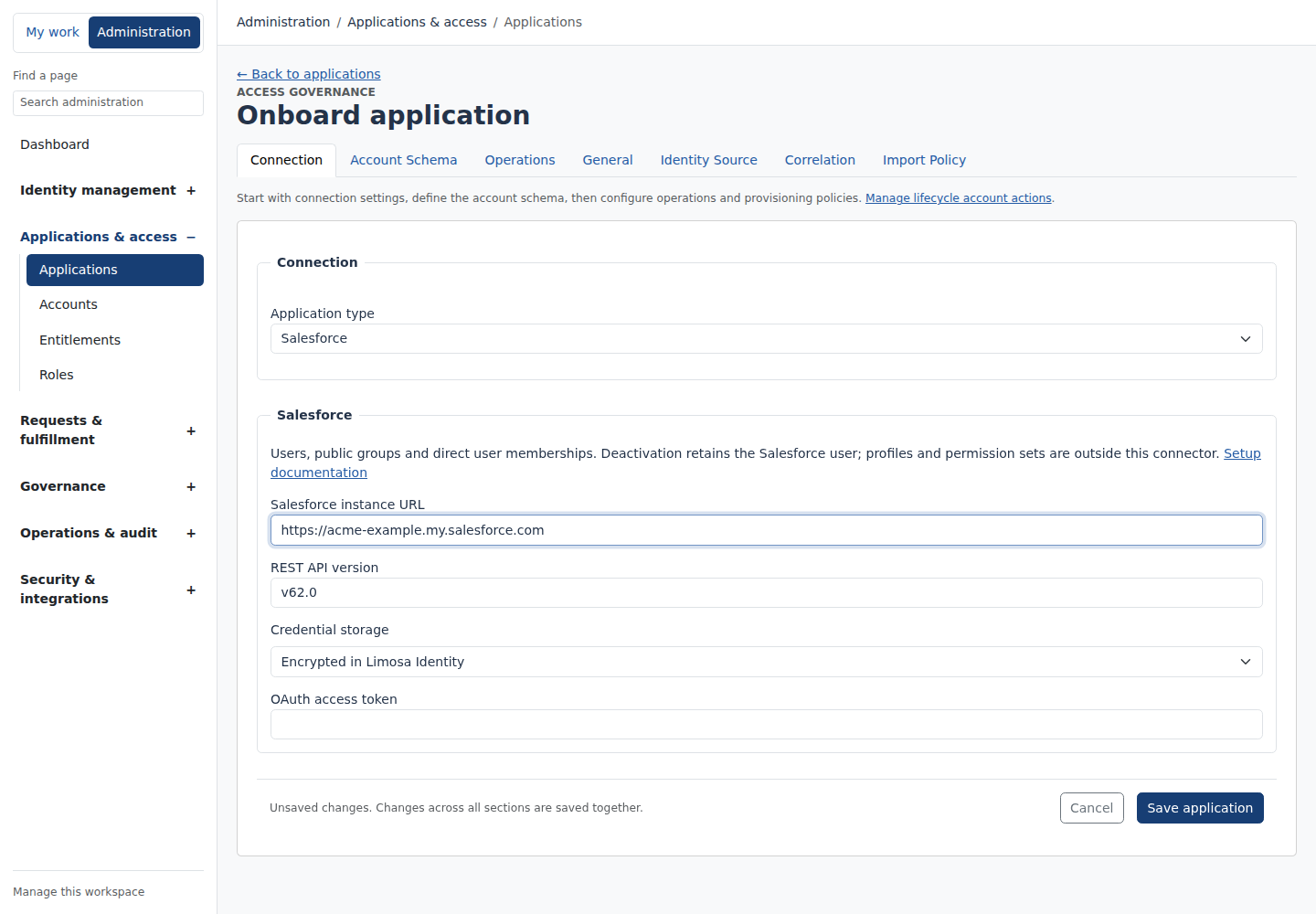
ACTUAL PRODUCT · EXAMPLE WORKSPACE

A dedicated setup
for each connection.

Choose the application type, review its supported scope and configure the endpoint and credentials. Account schemas, operations, correlation and import policy each have a focused place.

Explore the latest connector additions →
Salesforce · Connection settings PRODUCT SCREENSHOT
Salesforce setup in Limosa showing its supported scope, instance URL and credential settings
Authenticated John Doe example workspace. Synthetic endpoint; no provider connection or live provisioning is demonstrated.

FOR THE REST OF YOUR LANDSCAPE

A path for custom
and legacy systems.

Use standards, structured files or configurable API connections when a dedicated connector does not fit.

SCIM

Connect supported user and group operations through a standards-based endpoint.

Web services

Configure API requests, mappings and supported operations for a tailored integration.

CSV

Import structured files, map fields and correlate accounts when an API is unavailable.

CREDENTIALS WITH CONTROL

Connect applications.
Keep secrets in your vault.

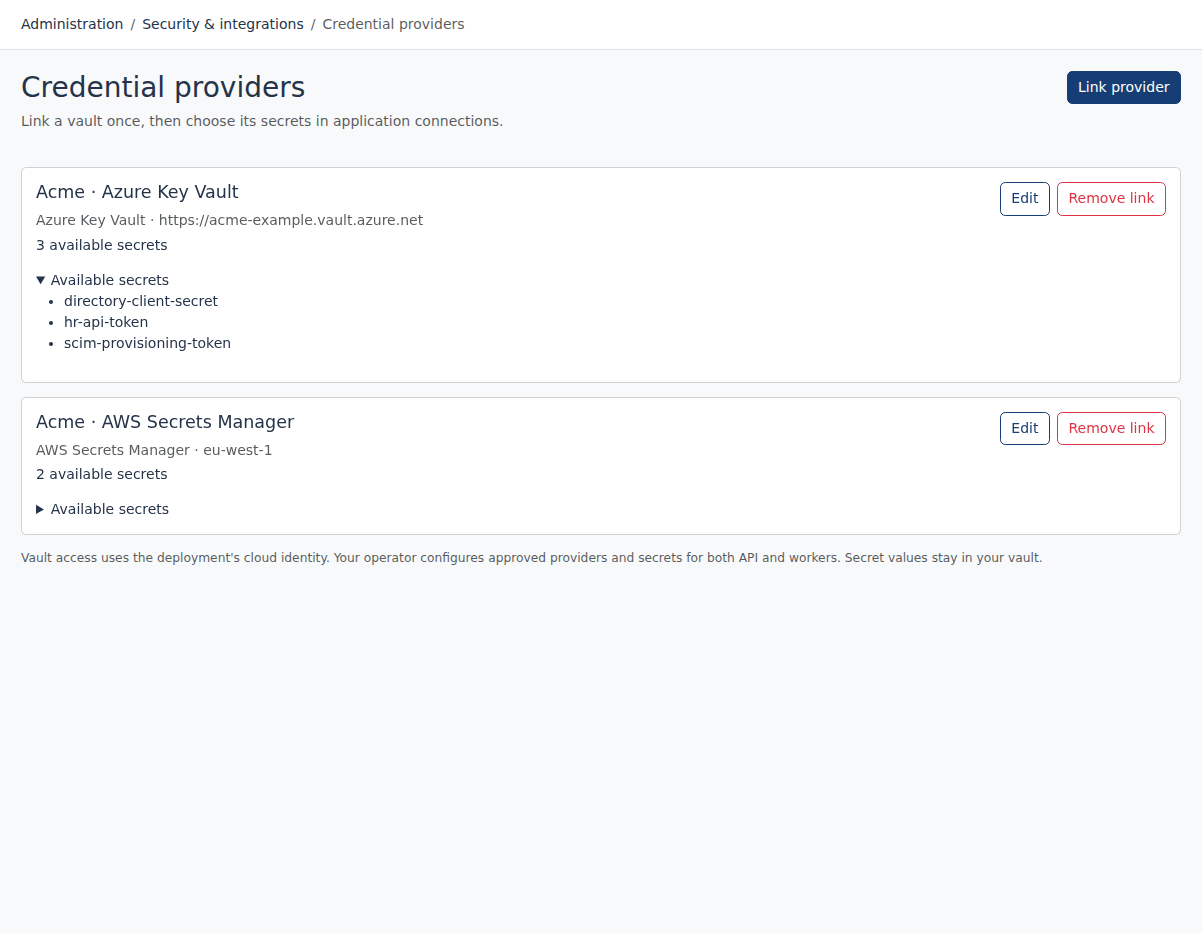
Link deployment-approved Azure Key Vault, AWS Secrets Manager and Google Secret Manager providers. Select secret aliases in application editors without exposing their values.

Explore security & control →
Credential provider linksEXAMPLE WORKSPACE
Credential provider links in the populated Acme example workspace
Actual Limosa Identity interface · Synthetic example data · Signed in as John Doe. Select image to enlarge.

Product names identify compatible systems. No partnership or endorsement is implied. WORKDAY® is a trademark of Workday, Inc., registered in the United States and elsewhere. SAP and SAP SuccessFactors are trademarks or registered trademarks of SAP SE or its affiliates. Microsoft and Microsoft Entra are trademarks of the Microsoft group of companies. All other trademarks are the property of their respective owners.

PLAN YOUR INTEGRATION SCOPE

Choose the operation, not just the application name.

NeedWhat to confirm
Authoritative sourceRecord completeness, stable identifiers, required attributes and missing-record policy.
Access inventoryAccount and entitlement types, memberships, API permissions and correlation rules.
ProvisioningSupported write actions, account types, mappings, required target attributes and verification.
Custom or legacy systemAvailable SCIM or web-service endpoints, file imports and which work needs manual fulfillment.

For example, SAP SuccessFactors provides the documented HR source import. It does not imply SAP ERP or S/4HANA role provisioning. Each guide describes its own supported scope.

Plan a pilot with your application owners →

FULL AI SUPPORT

Your workflow.
Your AI assistant.

Operate and configure Limosa through an MCP-compatible AI assistant. The full management interface is available to AI, with the same permissions, validation and audit trail as the web workspace.

Start with https://identity.limosa.io/mcp. No existing Limosa account needed: sign in and create your workspace when prompted.

Connect your assistant ↗

YOUR NEXT STEP

See governance in practice.

Explore the public demo or bring your applications and governance questions to a guided conversation.